
FBR digital invoicing integration
Asan Invoice helps businesses manage digital invoices, validate invoice information, and streamline FBR invoicing workflows. Integration requirements depend on your circumstances and applicable FBR rules. Notified registered persons should use an integration route permitted by FBR — including a currently licensed integrator or PRAL where applicable — then connect software with the IRIS bearer token from that setup. FBR Digital Invoicing handles validation, submission, error mapping, and QR PDFs so you do not have to build or maintain your own API client.
After integration — reported invoices
Once PRAL accepts a submission, your PDF includes the FBR invoice number, digital invoicing branding, and a scannable QR code.
PRAL integration explainer
PRAL (Pakistan Revenue Automation Private Limited) operates the FBR Digital Invoicing API gateway. FBR’s published guidance requires notified registered persons to integrate through a licensed integrator; PRAL is commonly offered in IRIS as that integrator path. GetFBR is application software that calls the same API using your IRIS bearer token — it does not replace IRIS registration or category-specific FBR rules.
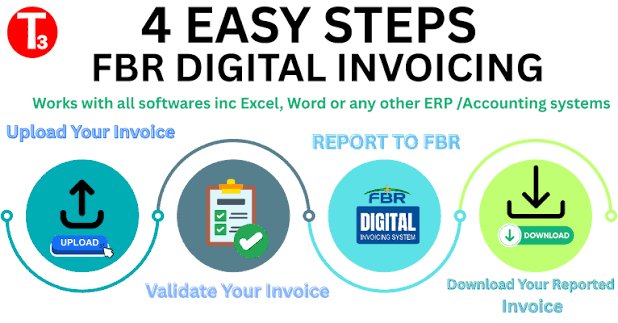
- 1. Enrol in IRIS Digital Invoicing Log in to IRIS with your NTN/CNIC, open Digital Invoicing, and complete FBR’s registration screens (including licensed integrator / PRAL where IRIS asks for it).
- 2. Generate a bearer token Create a sandbox token first, run the invoice scenarios FBR lists for your sector, then generate the production token when IRIS enables live billing.
- 3. Connect GetFBR Paste the token under Settings → FBR API tokens. GetFBR validates and submits invoice JSON to the PRAL-operated Digital Invoicing API on gw.fbr.gov.pk — you do not host your own PRAL client.
- 4. Validate, submit, archive Each accepted invoice returns IRN, USIN, and QR data. Download branded PDFs, sync from IRIS when needed, and issue debit/credit notes for adjustments.
Deep dive: FBR integration guide, register in IRIS, API integration.
Official FBR & PRAL references
Summaries below paraphrase themes from FBR’s public Digital Invoicing FAQ and IRIS screens. Labels and requirements change — always confirm on current FBR notices and in IRIS before go-live.
Primary sources
- IRIS taxpayer portal Login, Digital Invoicing enrolment, sandbox & production bearer tokens.
- Federal Board of Revenue (FBR) Official notices, SROs, and the Digital Invoicing user manual / FAQ published by FBR.
- FBR Digital Invoicing API gateway PRAL-operated host for validate/post invoice API calls (sandbox and production paths).
- PRAL corporate site Pakistan Revenue Automation — licensed integrator services for FBR digital invoicing.
What the official FAQ covers
Who must integrate?
Sales-tax-registered persons covered by FBR’s digital invoicing rules must transmit invoices electronically in real time through the approved integration route — not only manual IRIS entry.
Licensed integrator & PRAL
FBR’s FAQ describes integration through a licensed integrator. PRAL may provide integration services under FBR’s prescribed rules; many taxpayers select PRAL inside IRIS when enrolling.
See: Federal Board of Revenue (FBR) · PRAL corporate site · IRIS taxpayer portal
Sandbox scenarios before production
IRIS typically requires successful sandbox invoice scenarios (including debit/credit note cases where applicable) before a production token is issued.
IRN, USIN, and QR verification
Accepted digital invoices receive an Invoice Registration Number (IRN), USIN, and QR code buyers can verify — these identifiers define a compliant FBR e-invoice.
Returns & Annexure C
FBR states that validated digital invoice data may flow into sales tax return / Annexure C workflows; filing remains the taxpayer’s responsibility in IRIS.
API technical reference
Validate and post endpoints are documented for software integrators on the gw.fbr.gov.pk Digital Invoicing API — GetFBR implements those calls with your bearer token.
See: FBR Digital Invoicing API gateway · Federal Board of Revenue (FBR)
FBR compliance FAQ
Answers summarise themes from FBR’s published Digital Invoicing materials and IRIS screens. Tax law, SROs, and portal wording change — confirm obligations with your tax adviser and on https://www.fbr.gov.pk/ and https://iris.fbr.gov.pk/ before relying on them for filing decisions.
Integron Technologies provides invoicing software only — not tax advice, and not FBR or PRAL. Primary sources: IRIS taxpayer portal · Federal Board of Revenue (FBR) .
Can a taxpayer use PRAL for FBR integration?
FBR’s public Digital Invoicing FAQ states that notified registered persons must integrate through a licensed integrator, not only by re-keying invoices in IRIS. PRAL (Pakistan Revenue Automation Private Limited) is identified in official materials as a licensed integrator that may provide integration services under rules prescribed by FBR, and many taxpayers select PRAL when enrolling in IRIS Digital Invoicing.
Using PRAL for integration does not replace IRIS registration, bearer tokens, or sector-specific invoice scenarios. Taxpayers still complete Digital Invoicing setup in IRIS, generate sandbox and production API tokens, and meet FBR’s go-live checks. Third-party invoicing software then calls the PRAL-operated Digital Invoicing API on gw.fbr.gov.pk with that token — the software vendor is not PRAL or FBR.
In FBR Digital Invoicing: GetFBR is application software only: you complete IRIS/PRAL enrolment yourself, paste your IRIS bearer token into Settings, and GetFBR validates/submits invoice JSON to the same public API.
See: Federal Board of Revenue (FBR) · PRAL corporate site · IRIS taxpayer portal
What happens when an invoice submission fails?
When validate or post returns a rejection, FBR does not register the invoice. There is no valid IRN/USIN for that attempt until errors are corrected and a successful post is accepted. Common causes include buyer NTN/province mismatches, HS code or UOM issues, tax calculation differences, or token/environment problems — the API response includes FBR error codes and messages.
A failed attempt does not replace a previously accepted invoice. Each successful post is a distinct registration event. Taxpayers should fix data, validate again where appropriate, and submit once the payload matches FBR rules for the invoice type and sale scenario.
In FBR Digital Invoicing: GetFBR stores the FBR error on the invoice, sends an email alert to the account owner, and can notify your systems via an invoice.failed webhook. Correct the draft and validate/submit again. Invoices already accepted by FBR are locked in GetFBR to prevent accidental duplicate posts.
See: Federal Board of Revenue (FBR) · FBR Digital Invoicing API gateway
Can an invoice be edited after submission?
After FBR accepts a digital invoice, it is treated as a registered tax document with IRN/USIN and QR verification data. FBR’s digital invoicing framework is built around real-time registration; you should not treat a posted invoice like an editable paper draft. Material corrections or reversals are handled through the adjustment document types FBR defines (such as debit and credit notes) that reference the original registered invoice.
If an invoice was posted in error, follow FBR’s prescribed adjustment or cancellation process for your scenario rather than editing the registered payload informally.
In FBR Digital Invoicing: Once GetFBR records a successful FBR post, invoice body fields are permanently locked. Create a Debit Note or Credit Note linked to the original FBR invoice number, then validate and submit the adjustment through the API.
When should a debit note or credit note be issued?
Debit and credit notes are used when a sales tax invoice was already registered with FBR and the transaction must be adjusted — for example additional charges, price reductions, returns, or other corrections covered by your sector’s digital invoicing rules. FBR’s sandbox scenario lists include debit/credit note cases; production use requires referencing the original invoice identifier FBR returned (IRN / invoice number).
Issue adjustment documents in the tax period and with the line/detail accuracy FBR expects for the relevant sale type, rate, and buyer registration status. Your tax adviser can confirm which adjustments require a note versus a new sale invoice.
In FBR Digital Invoicing: In GetFBR, choose invoice type Debit Note or Credit Note, link the original submitted invoice, copy line items as needed, validate, then submit. Bulk CSV import supports invoice_type and original_fbr_invoice_id columns.
How can a business verify an invoice's submission status?
FBR’s FAQ describes verification using the IRN, USIN, and QR code returned when an invoice is accepted. Buyers and auditors can use QR verification and IRIS/FBR lookup tools published for digital invoices, subject to what FBR exposes for your environment.
Internally, match your ERP or billing reference to the FBR invoice number stored at submission time and retain the API response (including QR payload) as evidence of registration.
In FBR Digital Invoicing: GetFBR shows FBR status, IRN/USIN, and QR on the invoice page and PDF. Use Sync from IRIS or FBR Archive tools to refresh status when FBR lookup endpoints are available for your token; otherwise rely on the saved submission response and IRIS portal checks.
What information should be retained for an audit?
FBR’s digital invoicing guidance expects taxpayers to maintain a reliable trail of registered invoices: seller and buyer identifiers, invoice date, line descriptions, HS codes, tax rates and amounts, sale types/SRO references where applicable, and the FBR registration outcome (IRN/USIN/QR). Official materials also describe integration of accepted invoice data with sales tax return / Annexure C workflows in FBR systems — underlying source documents and integration logs support audit and reconciliation.
Retention periods and exact record formats follow the Sales Tax Act, applicable SROs, and current FBR notices. Keep sandbox and production environments clearly separated in your records.
In FBR Digital Invoicing: GetFBR keeps submitted invoices in your archive, downloadable PDFs with IRN/QR, compliance CSV export, per-invoice FBR request logs, and optional monthly summary email. Export regularly and align with your accountant’s record-keeping policy.
What FBR digital invoicing integration means
FBR digital invoicing integration is the link between the invoices you issue and the Federal Board of Revenue. Sales-tax-registered businesses in Pakistan send invoices electronically, in real time, through the Digital Invoicing API operated by PRAL. The credential is a bearer token you generate for your NTN in the IRIS portal.
You can build that connection yourself, hire a licensed integrator, or use software that already speaks the API. Integron is the third path: paste your token, create invoices in the dashboard (or via REST), and submit when you are ready.
What you connect — and what we send
- Your IRIS sandbox and/or production bearer token
- Seller NTN, address, and tax registration (once, in profile)
- Buyer NTN profiles, HS codes, UOM, and FBR scenarios
- Validate-then-submit calls to PRAL; IRN, USIN, and QR stored on the invoice
No IP whitelist for standard cloud use
Standard Integron use does not require server IP whitelisting. You generate the token in IRIS, paste it in settings, and work from a browser. That is the usual path for SMEs that want digital invoicing for FBR without an in-house integration project.
Sandbox first, then production
Use a sandbox token to run the invoice scenarios that apply to your business. Confirm each returns a valid response, then switch to your production token for live billing. See sandbox vs production and the step-by-step system guide.
REST API and webhooks
If you already have billing software, taxpayer accounts can create API keys and outbound webhooks for invoice events. The dashboard, PDF downloads, and FBR submission stay available alongside automation.
Compared with building it yourself
Direct PRAL API integration avoids a software subscription but typically needs months of engineering, scenario coverage, and ongoing API changes. Other licensed integrators can take weeks and may charge setup fees. Cloud software is how most teams get a working FBR digital invoicing system the same week — with 7 days free after approval. See feature checklist and ERP vs GetFBR comparison.
Questions about tokens or scenarios? Visit the Help center or contact us.
Ready to connect to FBR?
Start a free trial, paste your IRIS token, and validate your first invoice.
No credit card required · Sandbox before you go live