Lahore businesses comparing FBR e-invoicing software from ERP vendors (Bang.pk,
FastAccounts, AQSA EZCorporate, CT Products Isolate, and others) need the same IRIS/PRAL
compliance — with clear pricing and a path that does not force a full ERP replacement.
FBR Digital Invoicing is built by Integron Technologies, based in Walton, Lahore, Pakistan,
with WhatsApp and email support during Mon–Fri 9:00 AM–6:00 PM · Sat 10:00 AM–4:00 PM PKT.
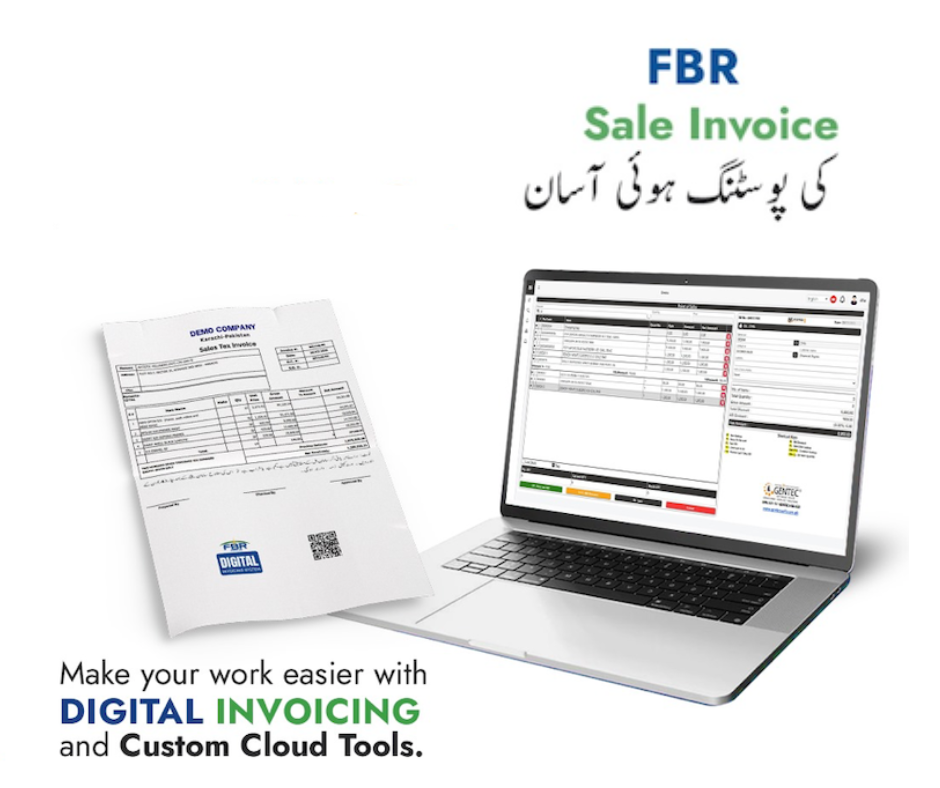
Sale invoice posting made easier
FBR e-invoicing for Lahore businesses
Official FBR digital invoicing workflow
Sale invoice posting made easier
Who we help in Lahore and wider Punjab
Sales-tax registered manufacturers, distributors, and service companies
Finance teams replacing manual IRIS entry with validate-then-submit workflows
Businesses that need sandbox scenario testing before production billing
Teams that want debit/credit notes, CSV import, and recurring billing without buying full accounting ERP
Bulk import for high-volume Lahore billing
Distributors and manufacturers in Punjab often invoice hundreds of lines per week. Use
bulk CSV import (Excel-friendly spreadsheets) and PDF extraction to build drafts,
then validate and submit through PRAL — the same federal loop as ERP suites, without buying inventory
and payroll modules you may not need.
Recurring & automated workflows
Recurring schedules, REST API keys, webhooks, and connector imports cover the “automated workflows”
language FastAccounts and similar vendors use — focused on FBR compliance rather than full GL.
GetFBR feature set (federal FBR)
FBR scenario support with validate-then-submit to PRAL
Debit and credit notes tied to original FBR invoices
Bulk CSV import plus PDF-to-row extraction for migration
Recurring invoice schedules with manual or scheduled runs
Branded PDFs with IRN, USIN, and QR after FBR accept
Buyer company library (unlimited customer NTNs per account), templates, and HS / UOM helpers
One seller NTN profile per login — add more legal entities with separate accounts or API from your ERP
Line-level sales tax with preset and custom rates; retail/MRP notified values when required
Sandbox and production IRIS bearer tokens in one account
REST API keys, outbound webhooks, and connector imports from external billing
Dashboard reports with CSV export and scheduled monthly summary email to your team
Async submission with in-app alerts and email when FBR submission fails
Plain-language FBR validation error guidance
Onboarding — in person or remote
Most Lahore customers start with a 7-day free trial
and remote setup: paste your IRIS bearer token, import buyers, and run sandbox invoices.
We walk through register digital invoice in IRIS
steps when your registration is still in progress — including when to select PRAL as licensed
integrator in IRIS. On-site visits are arranged case by case for larger rollouts — message us on
WhatsApp
or contact to discuss.
Provincial tax (PRA) vs federal FBR
Integration for Lahore POS, retail, and ERP
Retail and wholesale teams often need FBR POS integration
or ERP billing connected to FBR.
Integron is invoicing software — not a POS vendor — but exposes REST API keys and webhooks so your
developer or integrator can push invoice payloads after validation rules pass in the dashboard.
See the POS vs ERP comparison table (native POS,
inventory & purchases on full ERP; FBR API + API to your POS on GetFBR) and the
FBR integration overview.
Compliance note (read this before you buy any software)
FBR distinguishes commercial invoicing software from a licensed integrator.
Integron Technologies provides software that uses your IRIS bearer token to validate
and submit invoices — we do not claim to be FBR-approved or licensed unless stated on an official FBR list
for your deployment. Notified registered persons should follow FBR’s current rules for integrators and PRAL.
Our about page explains how we fit next to IRIS.
Full ERP vendors bundle POS, inventory, and purchases with FBR. GetFBR is invoicing software plus the federal FBR API — connect your existing POS or ERP through REST API and webhooks instead of replacing your till.
GetFBR is not a POS vendor. Use the comparison below to decide: buy their native POS, or keep yours and pipe sales to FBR through GetFBR.
Invoicing software versus full ERP for POS, inventory, purchases, and FBR API integration
Capability
Asan Invoice — FBR invoicing + API to your POS/ERP
Full ERP + FBR (Bang.pk, FastAccounts, AQSA (EZCorporate), CT Products (Isolate ERP), and similar Lahore ERP suites)
Native POS checkout (till / counter software)
Not included — FBR via API to your POS/ERP
Yes
Thermal receipts printed at point of sale
Not included — FBR via API to your POS/ERP
Yes
Offline POS billing with sync when online
Not included — FBR via API to your POS/ERP
Varies by vendor
Inventory, stock & warehouse management
Not included — FBR via API to your POS/ERP
Yes
Purchases, payables & full accounting ledger
Not included — FBR via API to your POS/ERP
Yes
Payroll, HR & multi-branch ERP modules
Not included — FBR via API to your POS/ERP
Yes
Federal FBR digital invoicing (validate, submit, IRN/QR PDF)
Yes
Yes
Keep your current POS or ERP — add FBR via API (no rip-and-replace)
Async FBR submit, webhooks & email when submission fails
Yes
Varies by vendor
Connector import from external billing / ERP
Yes
Varies by vendor
Line-level sales tax, further tax & retail/MRP notified values
Yes
Yes
Multi-user RBAC (viewer, branch roles)
One taxpayer login + API for ERP teams
Yes
Multiple seller NTNs / legal entities in one login
Not included — FBR via API to your POS/ERP
Yes
Sandbox FBR scenarios before production
Yes
Yes
Provincial e-invoicing (PRA, KPRA, SRB, BRA)
Federal FBR only — provincial via partners or your system
Often bundled (e.g. Bang.pk) or separate (e.g. CT Products PRA)
POS, inventory, and purchases = typical full ERP path.
Federal FBR + REST API to your POS = GetFBR path.
Provincial PRA/KPRA/SRB/BRA = not GetFBR — use partners or your existing system (Bang.pk-style bundles vs CT Products PRA as a separate service).
FBR integration overview ·
Lahore onboarding ·
API docs
Lahore: full ERP + FBR or GetFBR only?
Choose full ERP + FBR if you need
Native POS, thermal receipts, or offline retail billing
Purchases, inventory, payroll, and full general ledger
Provincial service tax (PRA, KPRA, SRB, BRA) in one ERP
On-site implementation across many branches
A single vendor for accounting plus FBR in one box
Choose Asan Invoice if you need
Dedicated federal FBR digital invoicing (validate → submit → IRN/QR PDF)
Sandbox scenario testing before production billing
Debit/credit notes, bulk CSV import, and recurring schedules
Branded PDFs, buyer library, and invoice templates
REST API, webhooks, and connector imports to your existing ERP or POS — no rip-and-replace
Validate and submit to FBR, debit/credit notes, bulk CSV import, recurring schedules, buyer library, templates, branded PDFs with IRN/QR, sandbox and production tokens, audit-ready archive with IRIS lookup/sync, CSV export, monthly summary email, REST API, webhooks, connector imports, and plain-language validation errors. Full checklist: https://asaninvoice.com/digital-invoice-software
How is GetFBR different from Bang.pk, FastAccounts, or full ERP vendors?
Those vendors often bundle POS, inventory, purchases, payroll, and sometimes provincial tax. GetFBR is a focused FBR e-invoicing layer with API hooks to your existing stack — compare on https://asaninvoice.com/digital-invoice-software and https://asaninvoice.com/fbr-e-invoicing-software-lahore.
What about FBR invoice integration, API, or POS/ERP?
Use the dashboard for day-to-day billing, or REST API keys and webhooks to connect ERP or POS flows. Technical pages: https://asaninvoice.com/integration, https://asaninvoice.com/fbr-api-integration, https://asaninvoice.com/fbr-pos-integration
Can I use PRAL as my licensed integrator?
FBR’s published FAQ states that notified registered persons integrate through a licensed integrator, and PRAL may provide integration services under FBR’s rules — often at no integration fee from PRAL. Complete Digital Invoicing setup in IRIS (including the integrator route that applies to you), then paste your bearer token into GetFBR. GetFBR is software that calls the PRAL API; it does not replace IRIS registration. Details: https://asaninvoice.com/integration
Can I edit an invoice after FBR accepts it?
After FBR returns an IRN, the posted invoice cannot be changed on FBR. Issue a debit or credit note linked to the original invoice reference, validate, and submit the adjustment through the same PRAL workflow. GetFBR supports adjustment scenarios in sandbox and production.
Does GetFBR replace my ERP, POS, or accounting software?
No. GetFBR is FBR digital invoicing software — draft, validate, submit, PDFs, import, and recurring billing. If you already run an ERP or POS, use REST API keys and webhooks to push invoice payloads after your billing system creates them. See https://asaninvoice.com/fbr-erp-integration and https://asaninvoice.com/fbr-api-integration.
Do you support PRA, KPRA, SRB, or BRA provincial e-invoicing?
No. GetFBR is federal FBR digital invoicing through IRIS/PRAL only. Provincial e-invoicing (PRA, KPRA, SRB, BRA) is not included — use integration partners, your existing ERP, or provincial specialists. Bang.pk-style vendors often bundle multiple provincial authorities with FBR; CT Products and others may sell Punjab PRA as a separate service from federal FBR. Confirm provincial obligations with your tax adviser.
Do you integrate purchases or provincial PRA invoices?
No. GetFBR covers federal FBR digital invoicing only — not purchase modules and not PRA, KPRA, SRB, or BRA. For provincial tax, use partners or your existing system (some Lahore ERP vendors bundle provincial sync; others such as CT Products offer PRA integration as a separate engagement). Use GetFBR or our API for federal FBR sales tax invoices.
Can multiple people use one account?
Each account supports multiple seller legal entities (NTNs), each with its own IRIS tokens under Settings → Legal entities. Invite team members as managers (full invoicing) or viewers (read-only reports and archives) from Settings → Team & reports, or automate from your ERP via API keys on the owner account.
Can GetFBR email or WhatsApp invoices to my customers?
Download branded PDFs with IRN and QR from the dashboard, then share them with buyers via your own email or WhatsApp. GetFBR emails your team when FBR submission succeeds or fails — it does not send customer-facing invoice mail by default.
Does FBR digital invoicing help with sales tax returns?
FBR’s Digital Invoicing FAQ states benefits such as real-time submission, fewer manual errors, and that accepted invoices may auto-populate Annexure C and sales tax return data in FBR systems. GetFBR submits compliant invoice data to PRAL; your return filing process in IRIS remains your responsibility — confirm on current FBR notices.
Do you offer debit and credit notes after FBR submit?
Yes. After FBR assigns an IRN you cannot edit the live invoice — create a linked debit or credit note, validate, and submit the adjustment. Test adjustment scenarios in sandbox first.